kicad-irdrop: how much voltage does a circuit board lose?
Copper isn't a perfect conductor, and a processor can tell. kicad-irdrop works out how much voltage a KiCad board loses between the power supply and the chip.
FirePod’s brain is a processor on a circuit board we design ourselves. The processor runs on about one volt, and it only works if that volt actually arrives. Every bit of copper between the power supply and the chip costs a little voltage on the way.
That processor is what listens to the song as it plays and works out where the beats are, so your lights can land on them. If its supply sags, it can stall or restart in the middle of a song.
Our first power check said the copper was fine. A reviewer didn’t believe it, and they were right: the check treated every copper area and every small hole joining the board’s layers as a perfect conductor. When we modelled the real copper instead, the processor’s supply was losing half again as much voltage as its budget allowed, and one tiny connection between layers was carrying half of the current on its own.
So we built a tool that calculates it properly. Today we’re sharing it.
kicad-irdrop
kicad-irdrop works with KiCad, the free and open source circuit design software. You tell it which power connection to check, where the power comes from and how much current the chip draws. It works out how much voltage is lost on the way.
- Real copper: every layer, every track and every connection between layers, including how thick the copper actually is.
- What the chip sees: it measures from the point the power supply watches, which is the voltage the chip really gets.
- Where the loss is: it points to the narrow spots and overloaded connections, which is what you need to fix it.
- Pictures: optional maps of where the current flows on each layer.
It’s free under the Apache 2.0 license.
Tried on boards we didn’t design
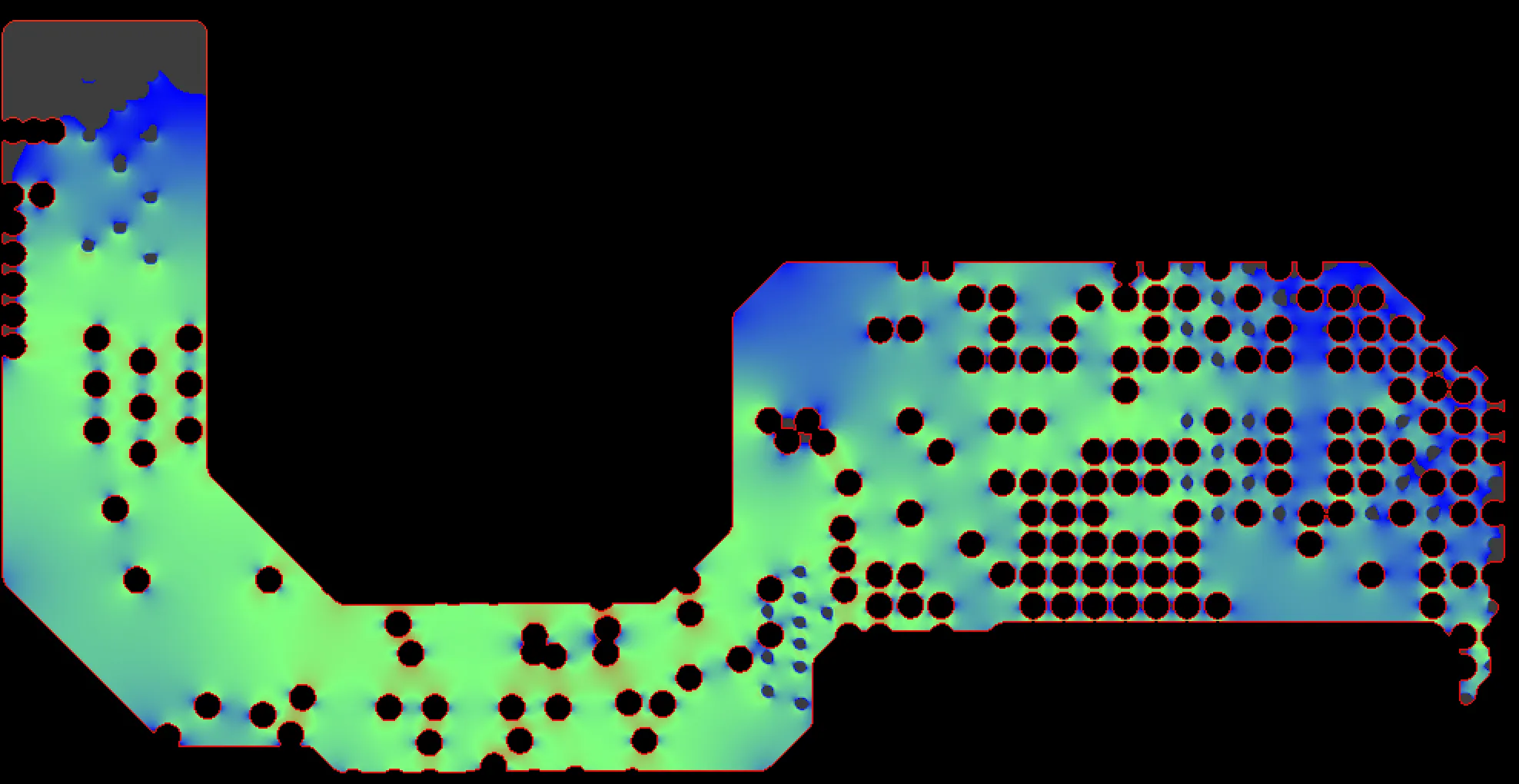
A tool that only works on our own board isn’t much use to anyone else, so we ran it on two open source boards from Antmicro, a company that publishes its hardware designs. On their 12-layer memory tester, the chip’s one-volt supply loses 17 thousandths of a volt at 3 amps, inside a 2% budget. The map shows the current flowing through one of the board’s inner layers on its way from the supply, at the top left, to the chip on the right. Blue copper carries little current; the greener and warmer it gets, the more it carries.
Checking the checker
We also built a small test board and solved it with padne, a separate open source tool that works out the same thing a different way. The two agreed within half a percent when a narrow track carried the loss, and within about two and a half percent when the connections between layers did. The comparison and the steps to repeat it are on GitHub.
More this month
This is the third of six open source releases leading up to Halloween, and the first of three tools from our circuit board review. Follow along on GitHub, or sign up for updates.
More from Firedance
-
matter_dcl: a Matter device lookup for Dart
Our second open source release turns the ID numbers smart lights broadcast into real names like "WiZ P45.E27". It's a small Dart package for Flutter apps.
-
Mixing smart light brands in one room
Our test room runs on WiZ, LIFX, Govee, GE Cync and Sengled lights at once. Here's what we learned getting different smart light brands to work together.
-
Party lights that sync to music, at home
Lights that move with the music can make a living room feel like a party. Here's what we've learned tuning them in our own test room, song by song.