kicad-skew
Checks length matching on a KiCad board using the lengths KiCad itself reports, against JSON rules, and flags pairs whose legs run on different layers.
KiCad’s own skew rules check the spread inside one group. A memory layout needs more than that: every data line against its strobe, command and address against the clock, the strobes against the clock. kicad-skew checks those relations from a short JSON rules file.
It doesn’t model length. It asks KiCad. Each selected net gets an impossible maximum length in a scratch copy of the board, kicad-cli pcb drc runs, and the real length is read back from the violation. That’s the number KiCad’s length tuner shows, with the via barrel between the layers actually used and any pad-to-die lengths on the pads.
Then there’s the problem length can’t see. Two legs of a pair can match in millimetres and still run on different layers, one as a microstrip and one as a stripline, uncoupled and out of step in picoseconds. --layers reports those pairs.
Install
pip install git+https://github.com/firedanceio/kicad-skew
kicad-skew board.kicad_pcb rules.json
It needs kicad-cli from KiCad 8 or newer, found through --kicad-cli, KICAD_CLI, your PATH or the usual install folders. The --layers check also needs KiCad’s pcbnew module, so run that one with KiCad’s Python. On macOS:
"/Applications/KiCad/KiCad.app/Contents/Frameworks/Python.framework/Versions/Current/bin/python3" -m kicad_skew board.kicad_pcb rules.json --layersWithout pcbnew it says the layer check was skipped and why, rather than reporting zero split pairs. --map out.png draws the measured nets on the board in the colour of their worst relation (Pillow required).
Rules
Lengths are in mm, or mil with "unit": "mil". Net selectors are regular expressions matched against the full net name.
| Type | Checks |
|---|---|
pairs | each net matching match against its partner, N minus P |
group | each member against the mean of the reference nets, such as DQ against its strobe pair |
spread | max minus min over the members |
between | mean of one set minus mean of another, such as strobe against clock |
A net that’s selected but not routed counts as a failure, not a pass. Exit status is 0 when everything is within tolerance, 1 for a failure or a split pair, 2 for an error.
Example: a 72-bit DDR4 channel
Antmicro’s open-source DDR4 RDIMM tester is a 12-layer board driving a registered DDR4 module: 64 data bits plus 8 check bits, each nibble with its own strobe. The repository’s rules for it hold every nibble within 1 mm of its strobe, command and address within 1 mm of CK0, and every pair within 12 mil.
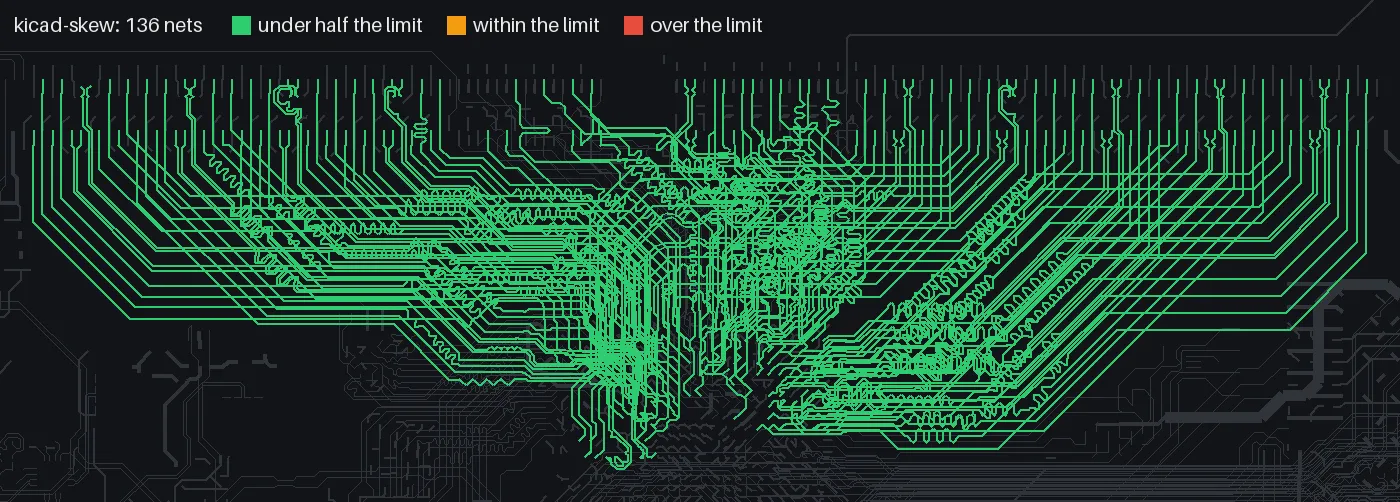
kicad-skew data-center-rdimm-ddr4-tester.kicad_pcb examples/antmicro-ddr4-rdimm-tester.json --layers --map skew.pngmeasured 136 nets (KiCad lengths: tracks + via barrels between the layers used)
PASS: 0 of 116 relations out of tolerance; 0 pairs split across layersClean. No nibble sits more than 0.06 mm from its strobe, and the worst pair, DQS10, uses 25 % of its limit. Those lengths include the FPGA’s package, 9.6 to 25.7 mm per net, which Antmicro entered on the pads. Matching on track length alone would have been off by up to 16 mm.
Limits
Board copper only. Package delays count only when they’re on the pads as pad-to-die lengths.
Length isn’t time. Legs on different layers, or nets on layers with different dielectrics, need a time-domain check, and --layers tells you where that applies. The sample LPDDR4 limits in examples/lpddr4-rockchip.json come from Rockchip’s RK3568 high-speed PCB guide; use your own SoC’s guide for real numbers.
Licence
Apache 2.0. The repository’s VALIDATION.md covers the unit tests and both Antmicro boards it was checked on.
Read the announcement: kicad-skew: making sure memory signals arrive together.